Assistants
Draft, test, and publish a workspace-owned assistant with locked tools and instructions.
An assistant gives a recurring task its own instructions, tools, and knowledge. Start a chat from the assistant to use its published settings on every turn.
Open Assistants. Admins and owners create and configure assistants. Members use published assistants.
Create an assistant
- Click Create assistant. Stedia opens a new, unpublished draft.
- In the Task step, keep With Stedia selected. Describe the task, the expected output, and when the assistant should ask you for help. Press Enter to send it. Shift+Enter starts a new line.
- Answer the follow-up questions. Under a question, Suggested answers offers short replies you can send with one click.
- Click Create proposal when you have said enough. The proposal appears in the conversation with the instructions, tools, knowledge, and reusable instruction blocks. Added and removed selections are marked, and a tool nobody has connected yet shows Not connected.
- Click Apply to draft. Review Tools and knowledge, then open Testing.
An assistant runs when someone asks it in a chat. If your task names set times, such as every Monday, Stedia points you to Schedules: add a schedule once the assistant is published.
The conversation stays available while the builder is open. It is not saved across page reloads. A proposal does not change the draft until you apply it. If you edit the draft after generating a proposal, generate a new proposal before applying it.
To enter the settings yourself, switch the Task step to Write it yourself. Existing assistants open there directly. The three steps stay clickable, so you can edit one part without repeating setup.
Configure tools and knowledge
In Write it yourself, give the assistant a name, icon, and instructions. Describe the job, its boundaries, and the answer you expect.
Use Tools and knowledge to select external tools. Selected tools lists what the assistant may use and whether each one works: Connected, Not connected, a connection that no longer works, or off for the workspace. Click Connect to connect a tool without leaving the builder. Add more from More tools, which has a search. The person chatting must have an active connection for the assistant to use that tool.
Select knowledge bases to provide information from your documents. Enable built-in actions such as web search or document generation only when the task needs them.
AI model sets the model the assistant answers with. Default runs it on the workspace's model from the AI settings. Pick a stronger model for research and a faster one for short answers. The list shows only the models the workspace's AI settings allow. If an admin later changes those settings so the chosen model no longer runs, the assistant falls back to the workspace's model until you pick another one. Tests run on the assistant's model. An assistant made from a starter begins on Stedia 1.2, and each starter names the model it begins on. Every card on the Assistants page names the model the assistant runs on.
Reusable instructions are published instruction blocks that several assistants can share. An assistant keeps the selected block version until an admin selects another version. Create instruction block creates and publishes a block, then adds it to this draft.
Workspace rules in the More actions menu (the three dots beside Publish) opens the shared rules separately. So does Manage workspace rules below the steps. These rules apply to every chat, assistant and schedule in the workspace. In an assistant they come before reusable instructions and the assistant's own instructions. A tool blocked here is unavailable everywhere.
Save draft appears beside Publish while you have unsaved edits. Leaving the builder with unsaved edits asks first, whether you click Back to assistants, a link in the sidebar, or reload the page. Stedia also saves pending edits before an AI setup request, test generation, a test run, or publication. If saving fails or another person has changed the draft, the action stops and your inputs remain available.
Test with examples
Open Testing and type a request into the box at the top, the way it would arrive in a chat. Press Enter. The assistant answers on example data, and the tool calls it made appear above the answer. Under Does the answer fit?, click Yes, keep as test to keep the request as a saved test, or No to drop it and go back to the instructions.
Saved tests lists every test. Add more with Suggest test cases, Add your own example, or Import from a chat, then click Run all. While the run is going, the button counts the finished tests, and each test shows Waiting until its result is in. Click a test to see the expected behavior, the answer, and which checks passed. Expand Inspect simulated actions for technical details.
Simulation uses example tool responses. It never calls connected services or loads their credentials. When the example has no data for an action, the simulation makes up a result and says so under the answer. A check that cannot be verified, or more than 12 made-up results, makes a result Incomplete. A response that misses an expectation is Failed. Could not run means execution encountered an error.
The results name the draft version they tested. After editing the draft, each test reads Not run on this draft yet until you run it again.
Publish a version
Click Publish, review the settings and test status, then confirm to create a published version. Unless every saved test passes on the current draft, Stedia asks you to confirm before publishing.
Open Versions from the More actions menu to inspect published versions. Restore to draft copies an older configuration into the draft. It does not change the live version until you publish again.
To delete an assistant, open the More actions menu and click Delete assistant. Threads started from it stay, but are no longer grouped under it. Schedules that use it keep running without it.
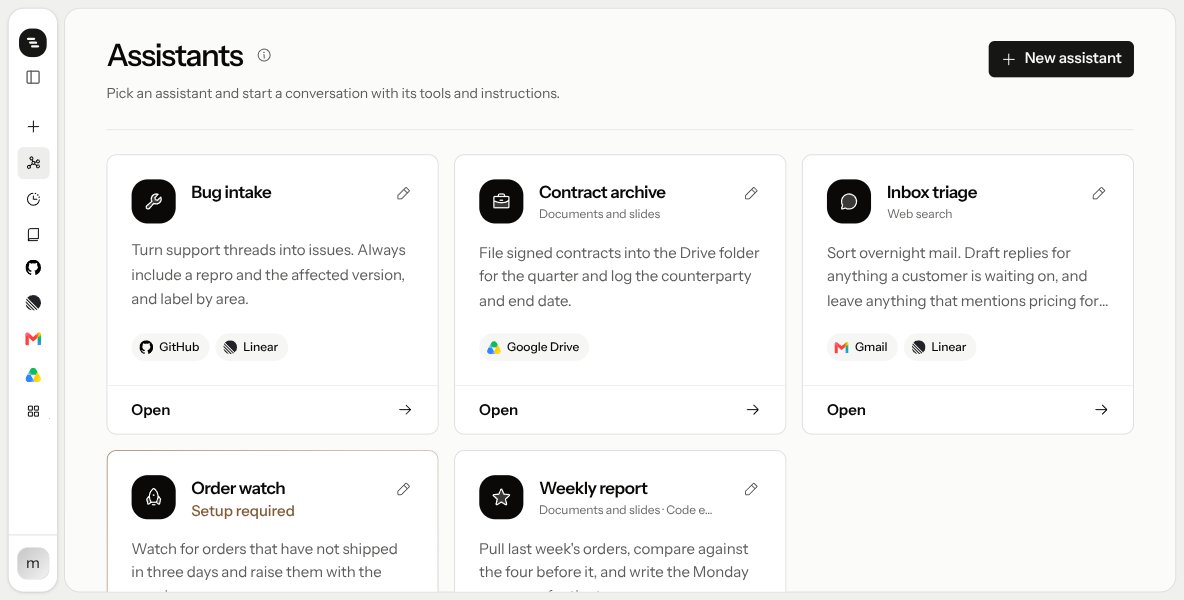
After the first publication, the assistant card shows a snippet of instructions and its tool tiles.
Open a thread
Click Open on the assistant's card. Stedia starts a new chat that uses the assistant's instructions and tools.
If a locked tool is missing for you, the card says Setup required and names the tool. Click Open connected tools, connect it, then open the assistant again.
How a turn works
The chat stays tied to the assistant. Every message uses its latest published version, with the assistant's tools that you have connected yourself.
Publish a new version and the next turn picks up its instructions. Draft changes do not affect existing threads.
Instructions or an action preset
Instructions describe how the assistant behaves. They apply to every message in a chat started from this assistant, whatever tool it uses.
An action preset is narrower: one tool's action, its field defaults, and how to write with it. It applies wherever that action is called, including chats without an assistant.
Use instructions for how this assistant behaves. Use an action preset for how one action gets filled in.
Example: an offer writer
Say you send offers every week and want them to look and sound the same.
- Name: Offer writer
- Instructions:
You write offers for our customers.
Take prices only from the price list in Google Drive. Never invent a price or a discount.
If the customer, the quantity or the delivery date is missing, ask before you write.
Write in the customer's language, friendly and short.
Return the offer as a PDF. Then prepare a short cover email as a Gmail draft.- Tools and knowledge: Google Drive, Gmail, and Documents and slides.
Test it in Testing with Add your own example:
| Request | What a good answer does |
|---|---|
| "Offer for Bäckerei Sonnenschein: 20 units of the standard package, delivery in two weeks." | Uses prices from the price list and returns a PDF plus a Gmail draft. |
| "Write an offer for Café Nord." | Asks for the quantity and the delivery date before it writes anything. |
Set up a stationery as the default, and every offer comes out on your letterhead.
Tips
- Write instructions like a brief for a new colleague. Say what the job is, what to never do, and when to ask you.
- Give it only the tools it needs. Fewer tools mean fewer wrong turns.
- Test the edge cases. Add one example with missing information and one that should be refused.
- Put shared rules in one place. A rule every chat and assistant should follow, like "never promise a delivery date", belongs in Manage workspace rules, not in each assistant.
Empty state
If you are an admin and the list is empty, Pick a starting point offers three assistants with full instructions: Inbox triage, Weekly digest and Customer replies. Or click New assistant. If you are a member, ask an admin to create one.