Work feed
The Activity tab in the sidebar lists what needs your decision, what is running, and what is queued.
The sidebar has two tabs: Home and Activity. Activity is a live feed of your work. It answers one question: is anything waiting on me?
The Activity tab shows a count of the items that need you, so you can see it while you are on Home. With the sidebar collapsed, the same count and a dot for running work stay visible.
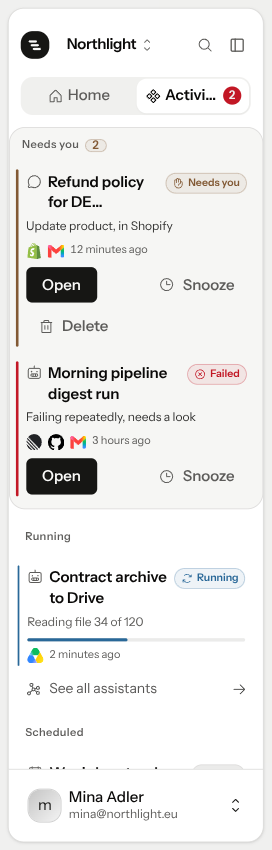
Three groups
Needs you. Anything stopped until you decide: an approval on a chat or a scheduled run, a question Stedia asked, or a schedule that keeps failing. The card says what it is waiting for, for example Send email, in Gmail, Waiting for your answer, or Failing repeatedly, needs a look.
Running. Work in progress, with how far along it is.
Scheduled. Schedules waiting for their next run, with the time they fire.
An empty group is left out. With nothing going on, the tab says Nothing waiting.
Act on a card
Open opens the chat or run where the decision is. Approve or deny it there, on the tool card.
Snooze holds the item until tomorrow morning. It comes back on its own.
Snooze is yours alone
A snooze lives in your browser. It never hides an approval from a teammate, and it expires by itself, so nothing disappears because one person deferred it.
Delete is on cards that belong to a chat. It deletes the conversation together with its open request.
Past three cards, Needs you collapses the rest behind a button such as Show 2 more. Click it to see them all.
Where it does not reach
The feed shows what is open. Finished conversations live in History, and files under Resources → Files. See Files.
If something goes wrong
I approved, but a card is still there. Each card is one open request. Once you decide, the card goes away. If the same chat or run then reaches for another action that asks first, a new card appears for it.
A card I snoozed is gone. Snoozed cards come back tomorrow morning. With nothing else waiting, the tab says how many items are snoozed. Because a snooze lives in your browser, the card still shows on another device or browser.
Activity could not be loaded. Click Try again. Until it loads, open the chat or schedule directly: something may still need you.
A teammate's approval does not show up. The feed shows what waits on you. Approvals in someone else's chat reach that person, not you.