Help center
How to use Stedia
Connect the tools your team already uses. Then ask in chat, hand recurring work to an assistant or a schedule, or have Stedia build an app. Anything that sends or changes something waits for your okay.
 GitHub
 Linear
 Gmail
 Outlook
 Teams
 Drive
 SharePoint
 OneDrive
 Excel
 Shopify
 GitHub
 Linear
Start here
Get started
Sign in, set up or join a workspace, connect a tool, send a first message.
02Concepts
Workspace, tool, action preset, assistant, schedule, app, file.
03Chat
Approvals, steps, files, and what Stedia leaves behind in a thread.
Build with it
Connected tools
Outlook, Gmail, SharePoint, Shopify and your own APIs. Stedia acts where the work already lives.
Action presets
Pin the fields an action always fills the same way, and how Stedia should write.
MCP servers
Add a vendor's MCP server from the catalog, or any other, and choose what it may do.
Assistants
One kind of work with fixed instructions and tools, so the whole team handles it the same way.
Schedules
Describe the job once. Stedia runs it on a cadence and asks before it sends or changes anything, unless you allowed it.
Admin
Members, SSO, models, BYOK, costs, and self-hosting.
A first hour
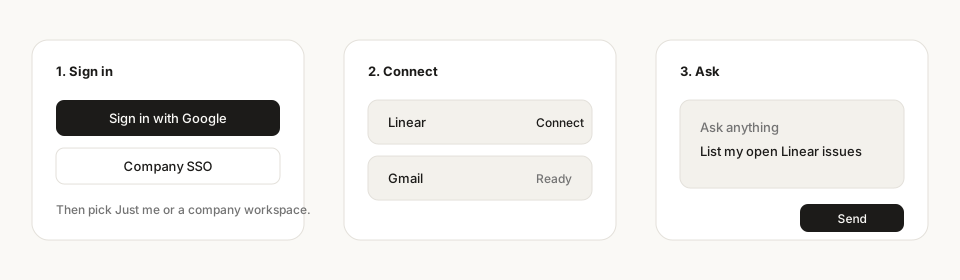
- 01Sign in with Google, Microsoft, or email.
- 02Connect Gmail, Outlook or Google Drive. Personal or shared with the workspace.
- 03Ask on Home. Approve what Stedia wants to send. Come back to the chat later.