MCP servers
Add a vendor's MCP server from the catalog, or any remote MCP server, as a workspace tool. Choose its actions and what asks first.
Adding an MCP server is for workspace owners and admins, on every plan. Pick one from the catalog, or open Connected tools, click Add your own, then Add an MCP server.
A remote MCP server becomes a tool your workspace owns. You pick which of its actions Stedia may call and what each one is allowed to do. Members then connect to it like any other tool, and those actions show up in chat, on assistants, and in scheduled runs.
A published server is available to every member.
Add one from the catalog
Under Connected tools, admins see More tools via MCP: servers that vendors host themselves, among them Notion, monday.com, ClickUp, Airtable, Miro, DeepL, Zapier, Make, Stripe, PayPal, Calendly, Klaviyo, Jotform, Webflow, Wix, WordPress.com, Jira and Confluence, developer tools such as GitLab, Sentry and Supabase, and the documentation of Microsoft and AWS.
Click Add on a vendor, for example Add Notion. The wizard below opens with the server filled in. You still sign in, pick and classify the actions and publish; nothing from the catalog goes live on its own.
- A setup you started shows Continue on its card. A vendor leaves the list once your workspace has a published or disabled server at its address.
- Microsoft Learn and AWS Knowledge need no sign-in. On a deployment without OAuth for MCP servers, only those two show.
- Atlassian admits only apps your Atlassian admin allows. For Jira and Confluence, the sign-in step shows Before you sign in with the domain your admin has to add.
- When another workspace already uses a vendor's id, yours gets four random characters appended, for example
notion_k3x9.
Add a server
Describe the server
Display name, tool id, and the server URL. The id becomes the action name prefix, so lowercase letters, digits, and underscores. The URL must be https. Private and link-local hosts are refused.
Transport is Streamable HTTP unless the server only offers server-sent events.
Choose the credential
The default is Detect automatically: Stedia checks the server's OAuth metadata before saving. If it finds none, pick the type yourself: bearer token, custom header, query parameter, no credential, or OAuth.
With OAuth, each member signs in to the server themselves and nobody types a token. Register the redirect URI shown in the wizard with your provider. Servers that do not register clients automatically need a client id entered by hand.
Sign in
The wizard connects with the credential you chose. With OAuth, you sign in to the server in the provider's window.
Read the actions
Stedia connects and lists what the server offers, along with the instructions the server sends about itself.
Pick the actions
Choose the actions Stedia may call, up to 25 per server. The counter tracks how many you have selected.
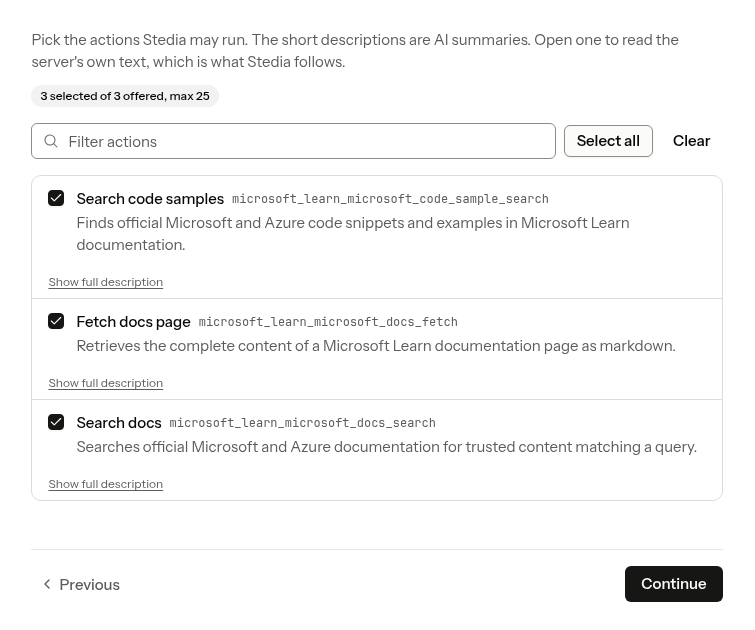
Each action shows a short summary written by AI. Show full description opens the server's own text, which is what Stedia follows. Descriptions longer than Stedia carries are shortened, and the wizard shows you the shortened text Stedia will actually read. Across the app, the actions then show short names in English or German instead of the server's raw tool names. Actions whose arguments cannot be read (not an object, too large, too deeply nested, too many arguments) are listed as unavailable with the reason.
Classify each action
MCP does not publish these, so set them here.
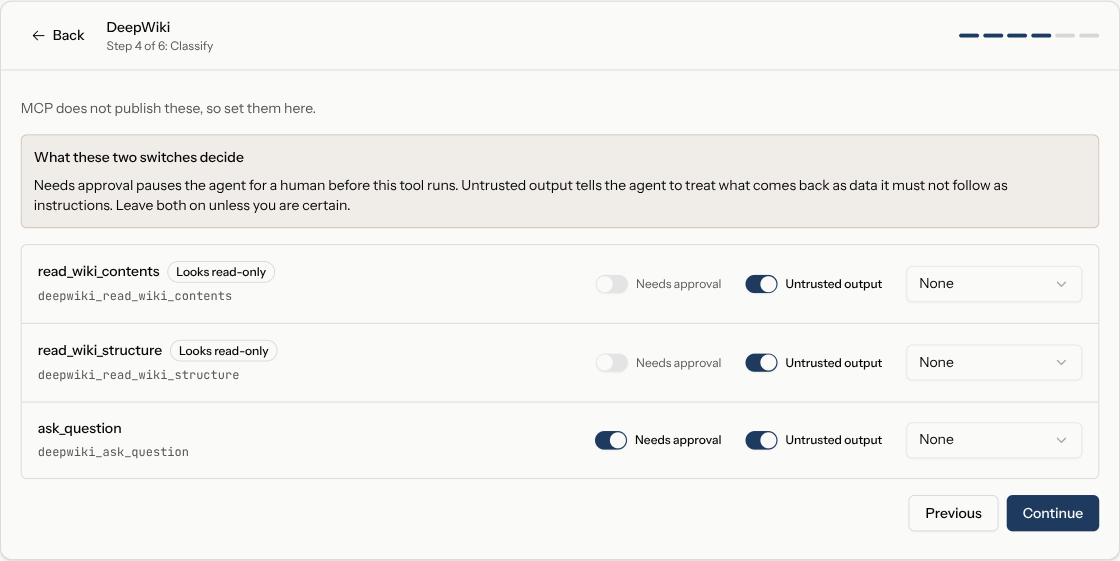
Asks first pauses Stedia for a human before the action runs. Untrusted output tells Stedia to treat what comes back as data it must not follow as instructions. Leave both on unless you are certain. Optionally tag a capability domain (issue tracking, email, calendar, and so on) so Stedia can spot overlap with your other tools.
Write instructions for Stedia
A few sentences telling Stedia when to reach for these actions. If the server sends its own instructions, you see them here, along with how much of that text fits. Cover anything below the cut in your own instructions.
Review and publish
Publishing re-reads the server and compares it with what you approved. The review shows the action count, roughly how many characters of action descriptions get added to every turn, which actions are gated, and any capability another tool already serves.
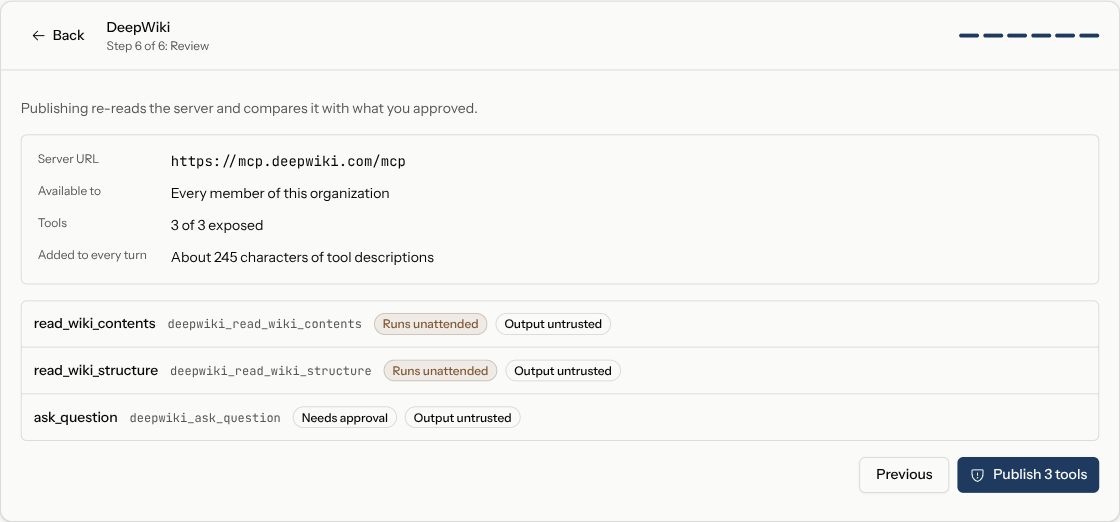
Publishing makes those actions callable by Stedia for every member. You can disable the server afterwards, but calls made in the meantime cannot be undone.
When the server changes
Stedia compares each action against what you approved. An action whose description changed is paused and flagged Changed, with the old and new text side by side, until you approve the change. An action that disappeared is marked Removed.
That is the point of the review: a remote server can rewrite an action description at any time, and a rewritten description is a rewritten instruction to the model.
Draft, Published, Disabled
A server sits in one of three states. Draft is yours alone while you configure it. Published is live for the workspace. Disabled keeps the configuration but stops every action.
Limits
Up to 25 exposed actions per server. Credentials are encrypted per connection. Bearer tokens, headers, and query parameters are supplied by each member when they connect, not shared from the wizard.
Tips
- Expose only the actions you need. Every action adds description text to every turn, and the review step shows how much.
- Keep Asks first on for anything that changes data. You can loosen it later per chat or per schedule.
- Write instructions that say when to use the server, not what it is. "Use this for questions about our product docs" helps Stedia more than a description of the server.
If something goes wrong
If connect fails, the server URL is wrong, the OAuth app is not registered for this Stedia API host, or the server rejected the client. If the wizard says "MCP servers are turned off for this deployment", the operator has not enabled them.
Self-host operators set the MCP OAuth env on the API. See Self-host.
Provider docs
- Model Context Protocol: what MCP is, and how to run a server.
- MCP specification: transports, tool schemas, and the authorization flow Stedia follows.