Models and BYOK
Pick chat, image, and research models, or bring a Vertex, Azure, or Bedrock key.
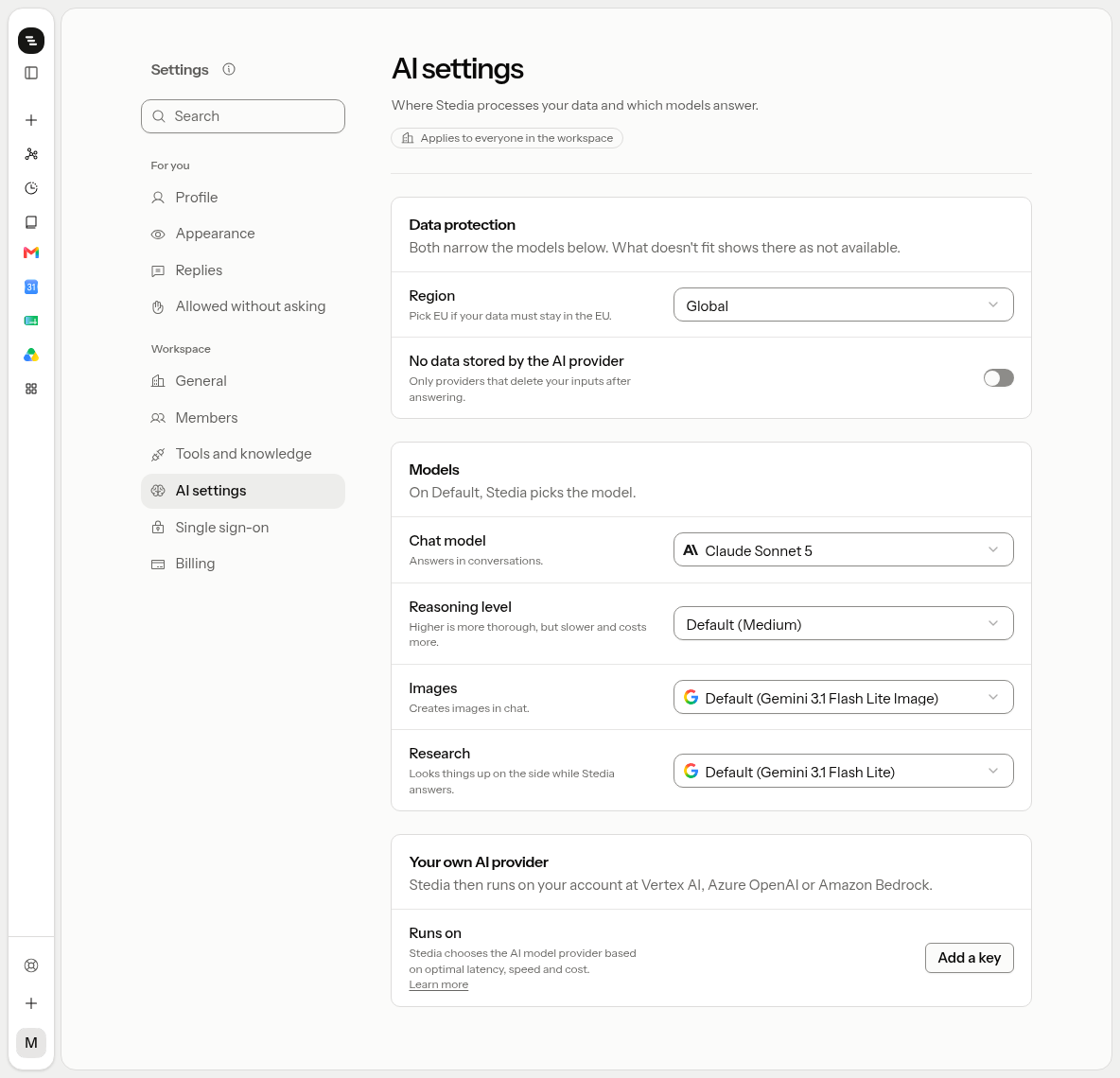
Open Settings → AI settings. Only admins and owners see this section. It has three cards: Data protection, Models and Your own AI provider. Data protection comes first, because the region and the retention switch narrow the models below.
Region
Region decides where the models run and store data for everyone in the workspace: Global lets the provider pick, United States and European Union pin a zone. Admins and owners set it.
Not every model runs in every zone. Models outside the chosen zone show as not available in the chat, research and image pickers, and a saved pick that no longer fits gives way to a model that does until you choose another. A pinned request that cannot stay in its zone fails rather than running elsewhere.
The pin covers chat, research and image calls, with or without your own AI provider, unless images have their own region (see Images). Gemini 2.5 Flash Image is the only image model that runs in the EU. Dictation and Read aloud still run wherever their provider serves them, which may be outside the EU. An admin or owner can turn both off with the Voice switch.
AI usage in the European Union has an additional 12% routing fee, for tokens and images alike. Calls on your own AI provider are billed by that provider and cost nothing extra. Global and United States keep the standard price.
No data stored by the AI provider
No data stored by the AI provider (zero data retention) routes every chat, research and image call only to providers that keep no prompts or outputs once the request is done. Admins and owners switch it on.
Not every model has such a provider. Models without one show as not available in the pickers, and a saved pick that no longer fits gives way to a model that does until you choose another. A request no such provider can take fails rather than running elsewhere.
The switch is not available while the workspace runs on its own AI provider, and a provider cannot be added while it is on: the gateway would skip your key and run the call on Stedia's credentials instead. Image generation is covered too, unless images have their own setting; dictation and Read aloud are not.
Images
Same for images is on by default: images follow the region and the retention switch above. Switch it off to give images their own Region for images and No data stored for images. The image picker then greys out what those two rule out, while chat and research keep the workspace settings.
This lets a workspace pinned to the EU run images globally, for example on Gemini 3.1 Flash Lite Image, which only runs globally.
No data stored for images works with your own AI provider, as long as Stedia runs the images. It is not available while Images on your key is on, and that switch stays off while it is on: the gateway would skip your key.
Models
Set:
- Chat model: answers in conversations.
- Reasoning level: Low, Medium, High.
- Images: creates images in chat.
- Research: looks things up on the side while Stedia answers. It also reads the PDF when you import a stationery.
These are model choices, not credentials. On Default, Stedia picks the model.
Web search and image generation are switched on and off under Settings → Tools and knowledge, not here.
How Stedia routes AI models
Without your own AI provider, Stedia sends every model call through the Vercel AI Gateway. The gateway serves each model from several providers and picks one per request. Its default order weighs reliability, response speed, and cost, and it recomputes as providers change. If a provider fails, the gateway retries on the next one, so a single outage does not stop a conversation.
Three settings narrow that choice:
- Region keeps calls in the zone you pick. Only providers in that zone are considered.
- No data stored by the AI provider keeps calls on providers that retain no prompts or outputs.
- Your own AI provider sends chat and sub-agent calls to that provider, with your credential.
Usage without your own AI provider is billed by Stedia.
Your own AI provider
Your own AI provider is part of Enterprise. On Pro and Business, the Runs on row shows a notice instead of Add a key, with a Contact sales link. A key saved on Enterprise stays stored after a plan change but is not used until the workspace is on Enterprise again.
Click Add a key, pick one provider and click Verify and save:
- Vertex AI (service account, project, location)
- Azure OpenAI (API key, resource name)
- Amazon Bedrock (access key pair, region)
A workspace holds at most one inference credential. After it is saved, selectable models are limited to what that provider serves. Token spend lands on that cloud invoice.
If the credential fails a call, Stedia falls back to platform inference. That call is billed by Stedia and its prompt reaches Stedia's provider account.
To stop that, an admin turns on Only your key. Turns then fail instead of running on Stedia. The AI Gateway cannot be told to skip its own retry, so when your key fails mid-turn, that turn can still finish on Stedia. After that your key is out of service: every turn fails until an admin saves the key again under Your own AI provider. A rate limit or an outage at your provider counts as a failure too.
Web search always runs on Stedia and is billed by Stedia, even with BYOK. Image generation runs on Stedia too, unless the workspace uses a Vertex AI key and an admin turns on Images on your key. Images are then billed to your Google Cloud account. Vertex AI only serves the Gemini image models: while the switch is on, the picker shows the GPT Image models as (not on your key), and a GPT Image model saved before names the Gemini model that runs instead. Azure OpenAI and Amazon Bedrock serve no image model, so the switch is off for them.
Workspace profile
What Stedia knows about you is under Settings → General. It holds standing notes Stedia sees in every member's conversations: company facts, conventions, and preferred tone. Keep it short and factual. Admins and owners edit it.